
Custom Software
Replacing Excel With Custom Software: When a Manufacturer Should Make the Jump
Replacing Excel for production work rarely starts as a software decision. It starts the morning two people open “the master” and find two different answers. Here is a practical way to tell when spreadsheets have quietly become a liability on your floor, and how to fix it without betting the plant on a year-long rewrite.
Why Excel Works Until It Doesn’t
Excel earns its place. It is on every machine, everyone half-knows it, and you can model almost any process in an afternoon without asking IT for anything. For a single person tracking a single thing, it is hard to beat. The trouble is that a spreadsheet that starts as one person’s tool quietly turns into the system the whole plant runs on, and a spreadsheet was never built to be that.
The failure is not dramatic. It is a slow accumulation of small problems that each look survivable on their own.
There is no single source of truth. The file gets copied to a shared drive, emailed, saved to a desktop “just for now,” and within a month there are four versions and no way to say which one is real. Naming it Production_Schedule_FINAL_v3_USE_THIS.xlsx does not fix it; it documents the disease.
There is no validation. A cell that should hold a quantity will happily accept a date, a note, or a fat-fingered number with an extra zero. Nothing stops it, and nothing flags it.
There is no audit trail. When a figure is wrong, you cannot tell who changed it, when, or what it was before. The conversation becomes “I didn’t touch it” against “well, someone did,” and nobody can prove anything.
There is no real concurrency. Two people in the same file means one of them is about to lose their work, or you are passing the file back and forth like a hot potato and serialising work that should happen in parallel.
Formulas fail silently. A dragged formula stops one row short, a reference shifts, a hidden column gets deleted, and the total at the bottom is simply wrong. It still looks like a number. It still gets sent to a customer.
And it does not talk to anything. Your machines, your ERP, your MES, your quality system all sit in their own worlds, so the spreadsheet becomes the manual bridge between them. Someone re-keys numbers from one screen into another, and every keystroke is a chance to introduce an error you will chase for a week.
The Signals It’s Time to Switch
You do not need a consultant to tell you the spreadsheet has outgrown its job. The plant tells you. The signals are usually sitting in plain view.
| Signal | What it costs you |
|---|---|
| Multiple conflicting copies of “the master” file | Decisions made on stale numbers; rework when the real version surfaces |
| Manual re-keying between the spreadsheet and ERP/MES/machines | Hours of clerical time plus transcription errors that surface downstream |
| No way to tell who changed a number, or when | Disputes that can’t be settled; the same mistake repeats because nobody can trace it |
| Monthly consolidation that eats days of someone’s time | A skilled person stitching files together instead of doing the job you hired them for |
| Errors reaching production or customers before anyone notices | Scrap, wrong shipments, credit notes, and trust you have to earn back |
| You can’t add another user, line, or site without it breaking | Growth stalls because the tool can’t follow the business |
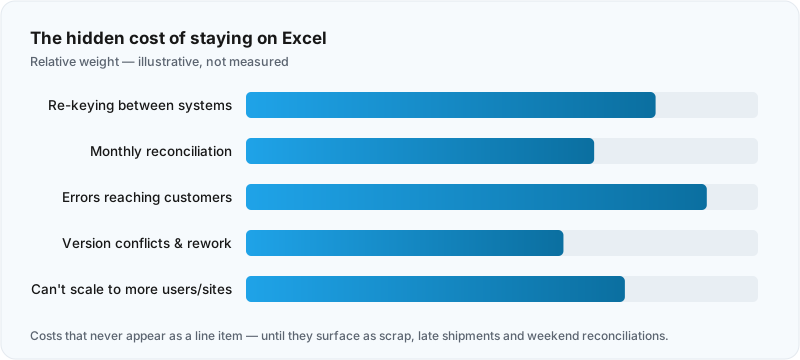
If you recognise three or more of these, the spreadsheet is no longer saving you time. It is quietly charging interest, and the bill arrives as scrap, late shipments, and weekends spent reconciling files.
What Custom Software Actually Replaces It With
This is where most people flinch, because they picture a two-year ERP implementation with a seven-figure price tag and a consultant who has never set foot on a shop floor. That is not what we are talking about.
What replaces a problem spreadsheet is usually a focused internal web tool. It does one job, or a small handful of related jobs, and it does them properly. The same data your spreadsheet holds today, but built on foundations a spreadsheet does not have.
It has roles and permissions, so an operator sees what an operator needs, a supervisor can approve, and not everyone can overwrite the master figure by accident. It has validation, so the quantity field only takes quantities, required fields cannot be left blank, and a number outside the sane range gets questioned before it is saved. It has real-time shared state, so everyone is looking at the same live data at the same moment, with no copies and no merging. It integrates, so it reads from and writes to your ERP, your machines, or your MES instead of making a person retype the numbers. And it reports, so the monthly consolidation that ate three days becomes a screen you open whenever you want it.
The important word is focused. This is not an ERP and it is not trying to be. An ERP tries to run your entire business from one platform and asks you to bend your processes to fit it. A focused tool wraps the one workflow that is hurting and leaves everything else alone. It is smaller, faster to build, far cheaper, and it fits how you actually work because it is built around how you actually work.
Build vs. Off-the-Shelf vs. Staying on Excel
There are three honest options, and the right one depends on how unusual your process is.
Staying on Excel is the correct choice more often than vendors will admit. If the spreadsheet is used by one or two people, the data does not need to be shared live, mistakes are cheap and easy to catch, and nothing downstream depends on it, leave it alone. Do not pay to solve a problem you do not have.
Off-the-shelf software is the right call when your process is genuinely standard. Accounting, payroll, generic inventory, CRM, those are solved problems, and a packaged product backed by a real vendor will beat anything custom on price and support. Buy it. Do not rebuild what you can license.
Custom software earns its place when the workflow is specific to how you run, when no product fits without forcing you to change your process to match the tool, or when the value is in joining systems that do not otherwise talk. If your edge is in how you schedule, route, or control quality, a packaged product flattens that edge into someone else’s idea of “standard.” That is exactly the case for building.
A Phased Migration That Doesn’t Bet the Plant
The mistake that sinks these projects is the big-bang rewrite, replacing nine spreadsheets across four departments in one go. That is how you end up six months in, over budget, with nothing in production and a plant that has lost faith in the whole idea.
Do the opposite. Start with the single workflow that hurts the most, the one spreadsheet everyone complains about, the one that causes the late shipments or the monthly weekend of reconciliation. Build a focused tool for that one process, get it into the hands of the people who use it, and prove the value before you touch anything else.
Run the new tool alongside the spreadsheet for a short period so people trust it before the old file is retired. Once that first workflow is solid and the team would not go back, move to the next worst one. Each step is small, each step delivers something usable, and at no point is the plant exposed to a risky cutover. If a phase disappoints, you have lost weeks, not a year, and you have a working tool to show for it either way.
Honest Cost and Risk Framing
Custom software is not free and it is not instant. A focused internal tool is a real project with design, build, testing, and a rollout where people have to change a habit. Budget for that change, not just the code, because the spreadsheet you are replacing has muscle memory behind it.
The honest comparison is not “Excel is free, software costs money.” Excel is not free. It costs you the re-keying hours, the reconciliation weekends, the errors that reach customers, and the growth you cannot take on because the tool cannot follow you. Those costs are just spread out and unbilled, so they never show up as a line item. A focused tool turns that hidden, recurring cost into a one-time, visible one, and after that the work it does is close to free.
The biggest risk is not the technology. It is building the wrong thing because the real process was never written down, or skipping the phased rollout and trying to swallow everything at once. Both are avoidable with a partner who starts by watching how the work actually happens before writing a line of code.
If your spreadsheets have quietly become the system your plant runs on, the fix is not a giant platform and it is not another weekend of cleanup. It is a focused tool that does the one thing that hurts, built around how you already work. That is the kind of custom software for manufacturers we build, one workflow at a time. If you can name the spreadsheet that causes the most pain, you already know where to begin, so start a project and we will look at it with you.